
The first Pixel Buds Pro had a persistent problem: they worked themselves loose. Google’s second generation answers that with a redesigned shell and a dedicated audio processor, the Tensor A1, that moves noise handling onto the earbud itself. This review walks through what actually changed, what Google claims the hardware does, and where the compromises are.
What Changed in the Hardware
The Pro 2 is a physical redesign rather than a cosmetic refresh. Three changes matter most:
- Twist stabiliser wing: An integrated rubber wing anchors against the inner cartilage of the ear. You seat the bud and give it a short backward turn to lock it in place. This is Google’s direct fix for the original’s tendency to loosen during movement.
- Stalkless button profile: Rather than the dangling stem used by most premium earbuds, the Pro 2 keeps a flush, button-shaped body. In practice this means less snagging on long hair and less contact with earrings, and noticeably less pressure behind the ear for glasses wearers on long listening sessions.
- Smaller shell: Google credits the efficiency of the Tensor A1 for a reduced overall footprint, which makes the buds easier to fit in smaller ear canals.
The Tensor A1 and Noise Control
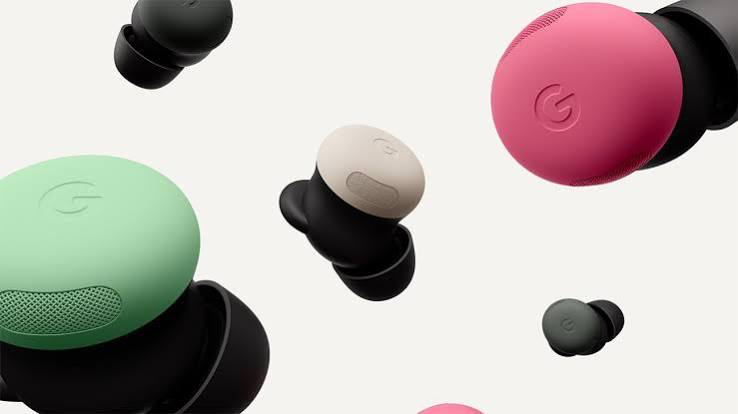
The Tensor A1 is a purpose-built audio chip rather than a general-purpose processor, and it is what Google leans on to justify the upgrade. According to Google’s published specifications it drives:
- Four audio modes: full Active Noise Cancellation, Transparency, Adaptive Audio, and off.
- Adaptive Audio: rather than sealing you off entirely, this mode dampens sustained low-frequency noise such as appliance hum or traffic while letting sudden or important sounds through.
- Conversation Detection: the buds recognise your voice, pause playback and switch to Transparency when you start speaking, then resume once you stop.
One caveat worth stating plainly: active noise cancellation is far more effective against constant low-frequency sound than against sharp, high-pitched or irregular noise. Sustained hum is what this technology handles well. Sudden noises are not going to disappear, whatever the marketing implies.
Hands-Free Control and Gemini
The Pro 2 integrate Google’s Gemini assistant for voice-driven control, which covers sending messages, setting reminders and checking a calendar without picking up a phone. Google states the Tensor A1 keeps the latency on these requests low. This is the part of the product most dependent on the wider Google ecosystem, and correspondingly the least useful if you are not already inside it.
Case, Battery and Tracking
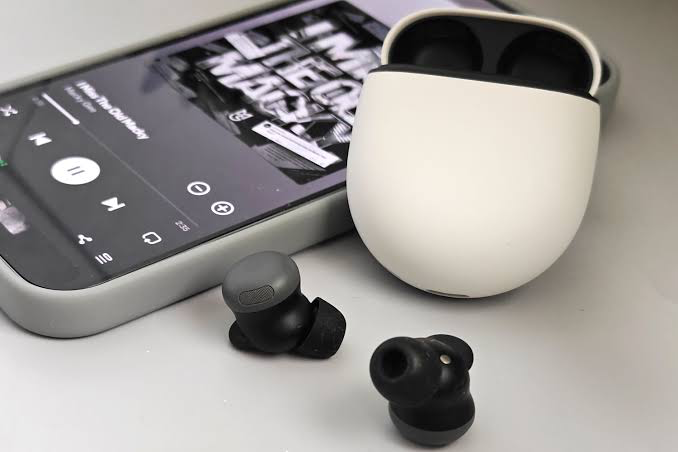
| Feature | Function |
| Pebble-shaped case | Compact enough for a pocket, with a smooth tactile finish. |
| Case speaker | Emits an audible chime, which is how you find the case when it has gone under furniture. |
| Find My Device | Locates lost buds or case on a map using Google’s device network. |
| Battery alerts | Low-battery audio cues, with wireless charging supported. |
Pro 2 Versus the Original
| Feature | Pixel Buds Pro 2 | Original Pixel Buds Pro |
| Fit mechanism | Twist stabiliser wing | Standard friction fit |
| Form factor | Compact stalkless button | Larger stalkless oval |
| Audio processor | Tensor A1 | Custom six-core audio processor |
| Fit stability | Anchored against ear cartilage | Prone to loosening over time |
Who It Suits, and Who It Does Not
The case for the Pro 2 rests on fit and noise control. If the original Pixel Buds Pro slipped on you, or if you wear glasses or earrings and found stemmed earbuds uncomfortable, the redesign addresses exactly those complaints. If you simply want competent wireless audio, Google’s cheaper Pixel Buds 2a cover the basics without the anti-slip hardware or the Tensor A1 — and at a materially lower price. Check current pricing before buying, as it moves frequently.
The Pro 2 are also least compelling outside Android and the Google ecosystem, where Gemini integration and Find My Device contribute little.
Frequently Asked Questions
- How well does the noise cancellation work on sudden noises?
Less well than on steady noise. ANC is most effective against sustained low-frequency sound; sharp or high-pitched noises are reduced but not removed. - Can Gemini be used entirely hands-free?
Yes. Google states that Gemini responds to voice commands without requiring you to reach for a phone. - How secure is the fit?
The twist stabiliser wing anchors the bud against the curve of the ear, which is Google’s stated fix for the original model’s tendency to work loose. - Do they work with iPhones?
They function as standard Bluetooth earbuds, but the assistant integration and device-tracking features are built around Android and Google accounts.
How We Sourced This Review
We have not carried out hands-on testing of the Pixel Buds Pro 2. This article is a review of the published specifications and design decisions, not a report of measured performance. Where we describe what the earbuds do, we are describing Google’s stated behaviour for the product. We have flagged in the text where a manufacturer claim deserves caution. If and when we test a unit directly, we will update this article and note the change in the revision history below.
Primary sources:
- Google Store — Pixel Buds Pro 2 product page and specifications
- The Keyword (Google) — Pixel Buds Pro 2 announcement
- Google Pixel Buds Help — feature and setup documentation
Corrections and clarifications: if you spot an error in this article, please contact us and we will correct it and record the change.